Hub & Spoke
Overview
When developing features that involve hub and spoke cluster configurations, you'll need at least two Kubernetes clusters:
- A hub cluster that serves as the central management plane
- One or more spoke clusters that are managed by the hub
This setup allows you to test:
- Cross-cluster communication and management
- Application deployment across clusters
- Policy enforcement and governance
- Multi-cluster observability
- Resource federation and sharing
Architecture
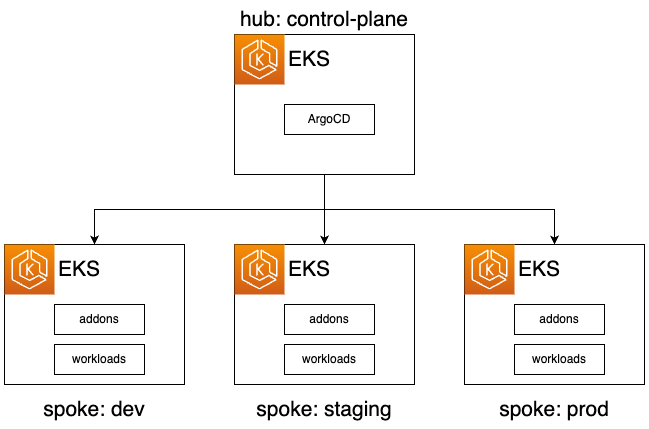
In the Hub-Spoke model, a centralized hub cluster is designated to host the Argo CD instance. This hub cluster serves as the control center and is responsible for managing resources across multiple spoke clusters. The spoke clusters, which could be numerous (e.g., 5 or 10), rely on the hub cluster for coordination and deployment. The Argo CD instance in the hub cluster is configured to oversee and make changes to the other clusters, offering a centralized and streamlined approach to cluster management.
Prerequisites
The following tools need to be installed on your local machine:
| Tool | Description | Installation Link |
|---|---|---|
| kubectl | The Kubernetes command-line tool | Install Guide |
| helm | The package manager for Kubernetes | Install Guide |
| terraform | Infrastructure as Code tool for cloud resources | Install Guide |
Setup the Environments
The release folder is used to mimic a tenant repository locally. Under release/hub-aws you will find the necessary files required to manage, test and develop with the hub and spoke setup.
$ tree release/hub-aws/ -L 1
release/hub-aws/
├── clusters
├── config
└── workloads
- We have two cluster definitions hub.yaml and spoke.yaml
- Note, similar to local development with local and the standalone development, the revision found in the cluster definitions are overridden, allowing you to use your current branch to validate changes.
How Branch-Based Validation Works
The revision_overrides variable in the Terraform .tfvars file is the key to validating a feature branch without touching cluster definition YAML. Setting it causes every source in the ArgoCD bootstrap chain to target your branch:
┌─────────────────────────────────────────────────────────────────────┐
│  terraform apply (hub.tfvars)                                        │
│    └─ revision_overrides.platform_revision = "feat/my-change"       │
│                                                                      │
│  ArgoCD bootstrapped on hub cluster                                  │
│    └─ bootstrap Application                                          │
│         └─ kustomize/overlays/hub/  (your branch)                   │
│              └─ system-platform ApplicationSet                       │
│                   └─ reads hub.yaml cluster definition               │
│                        └─ platform Application                       │
│                              ├─ apps/registration/hub  (branch)     │
│                              ├─ apps/system/           (branch)     │
│                              └─ apps/tenant/           (branch)     │
│                                                                      │
│  system-registration watches ALL cluster definitions (hub + spokes) │
│    └─ creates/updates ArgoCD cluster secret per cluster             │
│         └─ secrets carry enable_* labels → drive addon selection    │
│                                                                      │
│  Every push to the branch → hub ArgoCD picks up within ~3 minutes  │
│    └─ changes applied to both hub and registered spoke clusters     │
└─────────────────────────────────────────────────────────────────────┘
In the hub model, system-registration (apps/registration/hub/registration.yaml) watches all cluster definition files matching clusters/*.yaml. For each definition it creates an ArgoCD cluster Secret. Spoke clusters only become reachable once their cluster_authentication.server endpoint is supplied (see Cluster Authentication below).
Iterating on Changes
Once the hub is running, the iteration loop is:
- Make a change locally.
- Commit and push to your branch.
- ArgoCD on the hub polls the branch approximately every 3 minutes.
- Changes propagate to spoke clusters via the hub ArgoCD instance automatically.
You can force an immediate refresh:
# On the hub cluster
kubectl -n argocd get applications
argocd app refresh platform --hard
Provision the Hub cluster
- Take a look at the terraform code in the
terraformdirectory, and update anyterraform/variables/hub.tfvarsyou feel need changing. - Run the Makefile
make hub-aws; this will runterraform init,terraform workspace select huband provision the cluster. - Once the Hub has been provision
aws eks update-kubeconfig --name huband verify everything is working, we should see a collection of applications similar to below
You can view what the Makefile target is doing by opening the terraform/Makefile
kubectl -n argocd get applications
$ k -n argocd get applications
NAME                                 SYNC STATUS   HEALTH STATUS
bootstrap                            Synced        Healthy
platform                             Synced        Healthy
system-argocd-hub                    Synced        Healthy
system-aws-ack-iam-spoke             Unknown       Unknown
system-cert-manager-spoke            Unknown       Unknown
system-external-secrets-hub          Synced        Healthy
system-external-secrets-spoke        Unknown       Unknown
system-kro-spoke                     Unknown       Unknown
system-kust-cert-manager-spoke       Unknown       Unknown
system-kust-external-secrets-hub     Synced        Healthy
system-kust-external-secrets-spoke   Unknown       Unknown
system-kust-karpenter-hub            Synced        Healthy
system-kust-karpenter-spoke          Unknown       Unknown
system-kust-kyverno-hub              OutOfSync     Healthy
system-kust-kyverno-spoke            Unknown       Unknown
system-kust-priority-hub             Synced        Healthy
system-kust-priority-spoke           Unknown       Unknown
system-kyverno-hub                   Synced        Healthy
system-kyverno-spoke                 Unknown       Unknown
system-registration-hub              Synced        Healthy
system-registration-spoke            Synced        Healthy
The Unknown is expected, as the cluster is enabled in the cluster definition, but no server endpoint or authentication has been supplied to ArgoCD yet.
Provision the Spoke
With the Hub cluster provisioned we can now move forward and provision our first spoke cluster (we can consider this one dev).
- Update any required changes (VPC cidr etc) in the
terraform/variables/spoke.tfvars. - Run the Makefile target
make spoke-aws; against this will initialized the terraform, select a workspacespokeand run terraform apply. - We should have an empty EKS cluster now for the spoke.
Now we have to configure the authentication from the Hub to the Spoke.
Cluster Authentication
Authentication between the Hub ArgoCD and the spoke cluster is performed using pod identity. Each spoke has cross account role provisioned when the var.hub_account_id is defined. A trust policy is created allowing Hub account to assume this role, and via access entities this role is assumed to cluster administrator.
Note, the is nothing to stop you using another method, ArgoCD supports the following https://argo-cd.readthedocs.io/en/stable/operator-manual/declarative-setup/#clusters mode. You can use the cluster_authentication.config in the cluster definition and fill in any of the above methods of authentication.
Below is the cross account role.
## Create IAM Role for ArgoCD cross-account access
resource "aws_iam_role" "argocd_cross_account_role" {
  count = local.enable_cross_account_role ? 1 : 0

  name = "${var.cluster_name}-argocd-cross-account"
  tags = local.tags

  # Trust policy that allows the ArgoCD account to assume this role
  assume_role_policy = jsonencode({
    Version = "2012-10-17",
    Statement = [
      {
        Sid    = "AllowCrossAccountAssumeRole"
        Effect = "Allow",
        Principal = {
          AWS = format("arn:aws:iam::%s:root", var.hub_account_id)
        },
        Action    = "sts:AssumeRole",
        Condition = {}
      }
    ]
  })
}
You could bypass the updating of the cluster configuration by simply added an known endpoint i.e create route53 domain and use the EKS endpoint as a CNAME
On the Hub cluster pod identity allows the ArgoCD service account to assume the roles in the spoke accounts. The only manually change currently is adding in the Kubernetes endpoints URL post the creation.
- Once a spoke have been provisioned, you will have the Kubernetes endpoints URL in the terraform outputs or AWS Console.
- We need to update the cluster definition in the spoke to include this information i.e. below
## The authentication details for the cluster
cluster_authentication:
  ## The server to use for the cluster
  server: UPDATE_THE_EKS_ENDPOINT
  ## The configuration to assume the role using the cross account role
  config:
    awsAuthConfig:
      clusterName: spoke
      roleARN: arn:aws:iam::UPDATE_SPOKE_ACCOUNT_ID:role/spoke-argocd-cross-account
    tlsClientConfig:
      insecure: true
ArgoCD in the hub should now have everything it needs to communicate with spoke.
- Go back to the Hub cluster and run
kubectl -n argocd get applicationsyou should see the spoke applications now.
$ kubectl -n argocd get applications
NAME                                 SYNC STATUS   HEALTH STATUS
bootstrap                            Synced        Healthy
platform                             Synced        Healthy
system-argocd-hub                    Synced        Healthy
system-aws-ack-iam-spoke             Synced        Healthy
system-cert-manager-spoke            Synced        Healthy
system-external-secrets-hub          Synced        Healthy
system-external-secrets-spoke        Synced        Healthy
system-kro-spoke                     Synced        Healthy
system-kust-cert-manager-spoke       Synced        Healthy
system-kust-external-secrets-hub     Synced        Healthy
system-kust-external-secrets-spoke   Synced        Healthy
system-kust-karpenter-hub            Synced        Healthy
system-kust-karpenter-spoke          Synced        Healthy
system-kust-kyverno-hub              OutOfSync     Healthy
system-kust-kyverno-spoke            Synced        Healthy
system-kust-priority-hub             Synced        Healthy
system-kust-priority-spoke           Synced        Healthy
system-kyverno-hub                   Synced        Healthy
system-kyverno-spoke                 Synced        Healthy
system-registration-hub              Synced        Healthy
system-registration-spoke            Synced        Healthy
To start deploying applications to the spoke cluster, you can use the workloads directory in the release/hub-aws directory. View the workloads documentation for more information.